
Since our launch in January 2026, we’ve been listening closely to how you build. You told us you needed more control over the "active doing" part of learning. This release focuses on three core pillars: visual precision, content navigation, and enterprise-grade integration. We’ve empowered authors with better editing tools and provided organizations with the infrastructure to treat Stepwik as a truly professional, branded workspace.

Use STEPWIK26 coupon code to get your discount.
Valid until March 31, 2026.
This update boosts visual precision and DX. We’ve added AI lab generation, custom subdomains, and rich media support to turn any documentation into an interactive, branded learning experience.
Stepwik Chrome Extensions

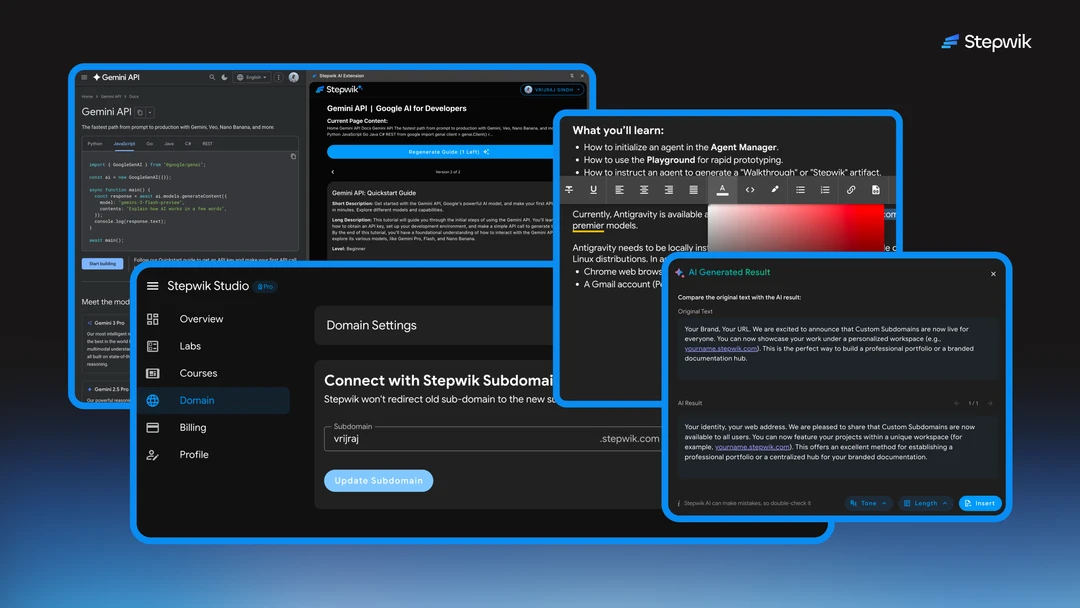
We are launching our first browser extension to bridge the gap between reading and doing. It solves the "manual migration" problem by allowing you to scrape and structure technical data from any site directly into a StepWik lab without leaving your browser.

Introducing Smart AI Rewrite

We’re bringing generative intelligence into the Studio to solve the "expert blind spot." This new tool transforms dense, jargon-heavy technical prose into simple, actionable steps optimized specifically for human memory and learner retention.
Context-Aware: Simplifies text without losing technical accuracy.
Retention-Focused: Organizes thoughts into digestible, numbered steps.
Instant Refinement: Clean up rough drafts with a single click.
Custom Subdomains (General Availability)

Previously in beta, we are now opening Custom Subdomains to everyone. This solves the "generic URL" problem, allowing you to move beyond our shared domain and host your workspace under your own brand (e.g., brand.stepwik.com).
Personalized Identity: Claim a unique URL for your entire workspace.
Instant Deployment: Go live on your custom subdomain in seconds.
Professional Portfolios: A centralized, branded hub for all your tutorials.

Vibrant Text Color Selection

We’ve upgraded the Studio editor to give you better control over visual hierarchy. This feature solves "visual fatigue" by allowing authors to highlight critical notes, warnings, or tips using a full color palette directly from the bubble menu.
Bubble Menu Access: Change colors instantly upon selecting text.
Custom Palette: Choose colors that match your brand or warning levels.
Improved Scanning: Helps learners find key takeaways at a glance.
Smart YouTube Embedding

We are expanding our media suite to include native video support. This solves the "external link" problem; readers no longer have to leave your lab to watch a tutorial, keeping them engaged and focused on the task at hand.
URL-to-Frame: Just paste the link; we handle the responsive embedding.
Native Playback: Watch videos without leaving the lab environment.
Seamless Flow: Perfectly fits the layout of your step-by-step content.
Now Supporting: Native GIFs

We’ve added GIF support to solve the "static documentation" problem. Since screenshots can't show a moving terminal or a UI interaction, you can now provide high-impact, looping visual demonstrations of your technology in action.
High-Limit Uploads: Supports GIFs up to 3MB for high-quality demos.
Looping Visuals: Ideal for terminal commands and UI hover states.
Drag-and-Drop: Upload GIFs as easily as standard images.
UI & Enterprise Improvements
Smoother Workflows for Developers. We are constantly refining the developer experience (DX). This update includes:
Section Linking: Smoother transitions and logic for internal navigation.
API Playground (Enterprise): A complete overhaul of the API testing suite, from instant key generation to streamlined payload testing.
Studio UI/UX: General visual enhancements to reduce friction and improve clarity.
See the detailed release note at
Thank you for the amazing support, encouragement, and energy throughout this week. None of this would be possible without our incredible community.